Migrating your valuable memories and personalized data from ChatGPT to Marketr AI ensures a seamless transition, allowing Marketr AI to understand your preferences, past interactions, and critical information from day one. This guide will walk you through the process of extracting your memories from ChatGPT and integrating them into your Marketr AI experience.
1. Retrieving Your Memories from ChatGPT
ChatGPT offers two primary methods to access and retrieve your saved memories and data. It's recommended to use both for a comprehensive transfer.
Method A: Manually Copy & Paste Specific Memories (Recommended for Precision)
This method is ideal for selecting and transferring specific, highly relevant memory items that you want to ensure are perfectly formatted for Marketr AI.
- Access ChatGPT Settings:
- Sign in to your ChatGPT account (web or app).
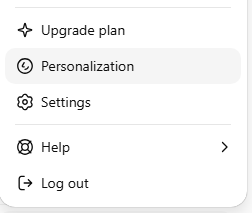
- Click on your profile icon, typically located in the top-right corner.
- Select "Settings" from the dropdown menu.
- Navigate to Memory Management:
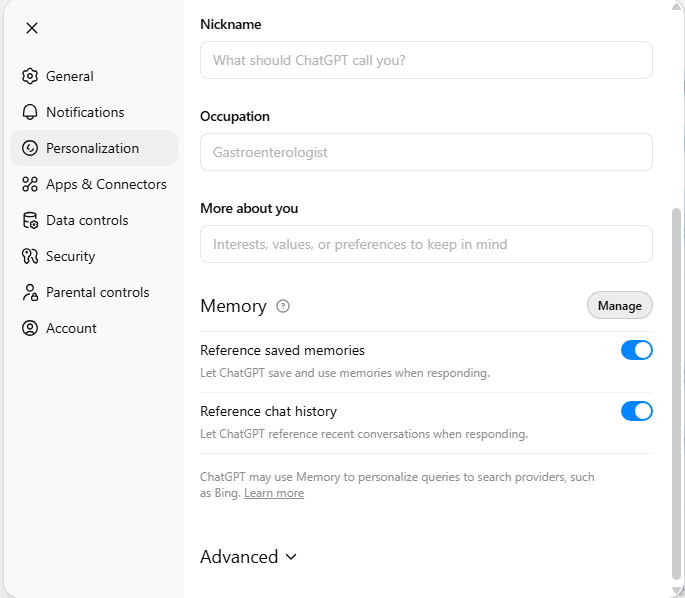
- Go to "Personalization."
- Then, select "Manage Memory" or "View Memory" to see all your saved memory items. This section allows you to review exactly what ChatGPT has stored about you.
- Copy Individual Memory Entries:
- Open each memory entry you wish to transfer.
- Select the text of the memory and copy it (Ctrl/Cmd+C).
- Paste this text into a local file such as a text editor, Google Drive document, or a spreadsheet. Save this file with a clear name and date (e.g.,
ChatGPT_memories_backup_2025-11-24.txt).
Why Manual Copy & Paste? This approach is fast, requires no additional tools, and helps avoid potential issues with scraping that might violate terms or break due to UI changes. It’s a reliable way to ensure you capture the exact memories you need.
Important point:
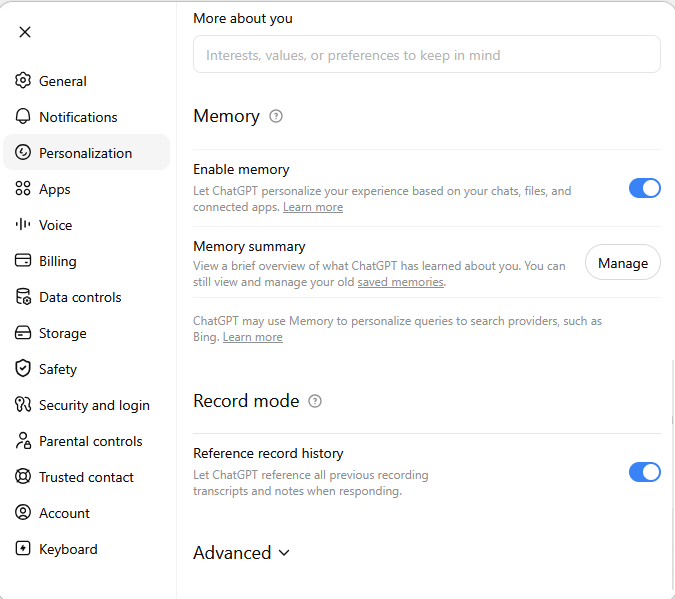
There is a chance that your Personalization settings may look different if you are using a paid account.
You may also see an additional option to Enable Memory, as well as the ability to add information to your Memory Summary by clicking the Manage button.
Method B: Using the Official Data Export (For a Full Account Backup)
For a comprehensive backup of your entire account data, including conversation history and other information, use ChatGPT's official data export feature.
- Initiate Data Export:
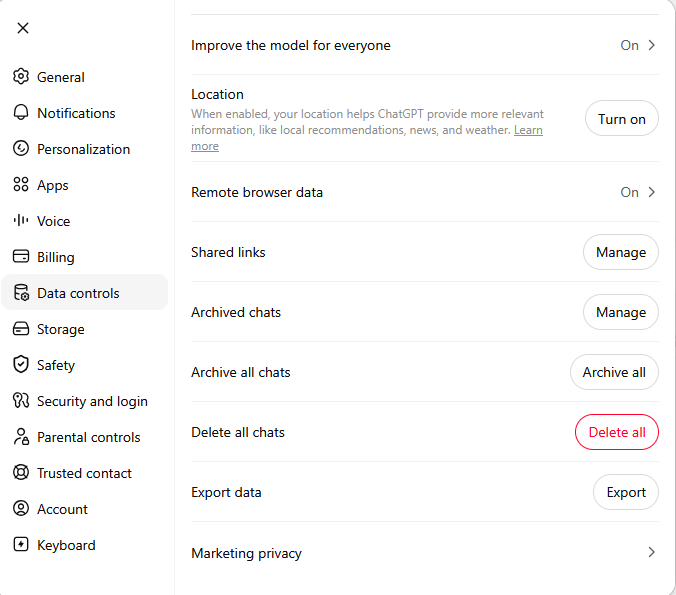
- In ChatGPT, go to "Settings."
- Navigate to "Data Controls."
- Select "Export Data" and then click "Export."
- Confirm your request when prompted.
- Download Your Data:
- OpenAI will send you an email containing a download link. Be aware that these links typically expire, often within 24 hours, so download your data promptly.
- Store the downloaded file securely on your local device.
Note: The official export contains your full account data and conversation history. While it may not present "memories" in a distinct, easily digestible format, it is the authoritative way to obtain a complete dump of your account information.
2. Importing Your Memories into Marketr AI
Once you have retrieved your memories from ChatGPT, you can easily integrate them into Marketr AI to enhance your personalized experience.
Method A: Using Marketr AI's "Create Memory" Feature
This method is ideal for adding individual, well-structured memories directly into Marketr AI.
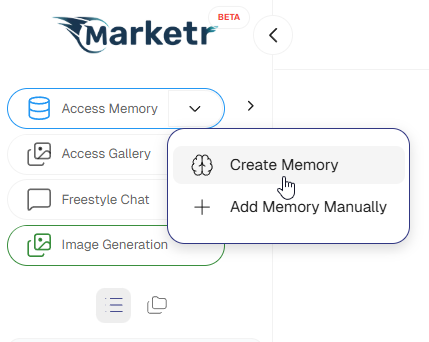
- Access "Create Memory" in Marketr AI:
- Log in to your Marketr AI account.
- Navigate to the " Access Memory".
- Look for an option like "Create New Memory" or "Add Memory Manually."
- Paste Your Copied Memories:
- Copy the specific memory text you retrieved from ChatGPT using Method A.
- Paste this text into the designated input field within Marketr AI's "Add Memory Manually" feature.
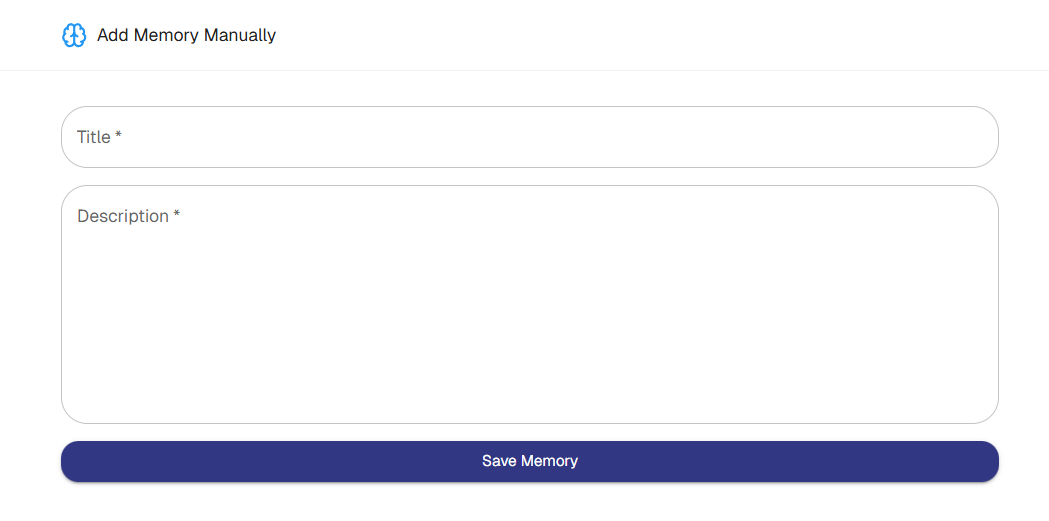
- Save the new memory.
Method B: Uploading Memories via File to Marketr AI, and Analysis the categories
If you have multiple memories saved in a text file or a structured document (like from Method A's manual backup, or potentially parsed data from Method B's full export), you can upload them.
- Locate Upload Functionality:
- Within Marketr AI's "Create a Memory" section, look for an "Upload File" option.
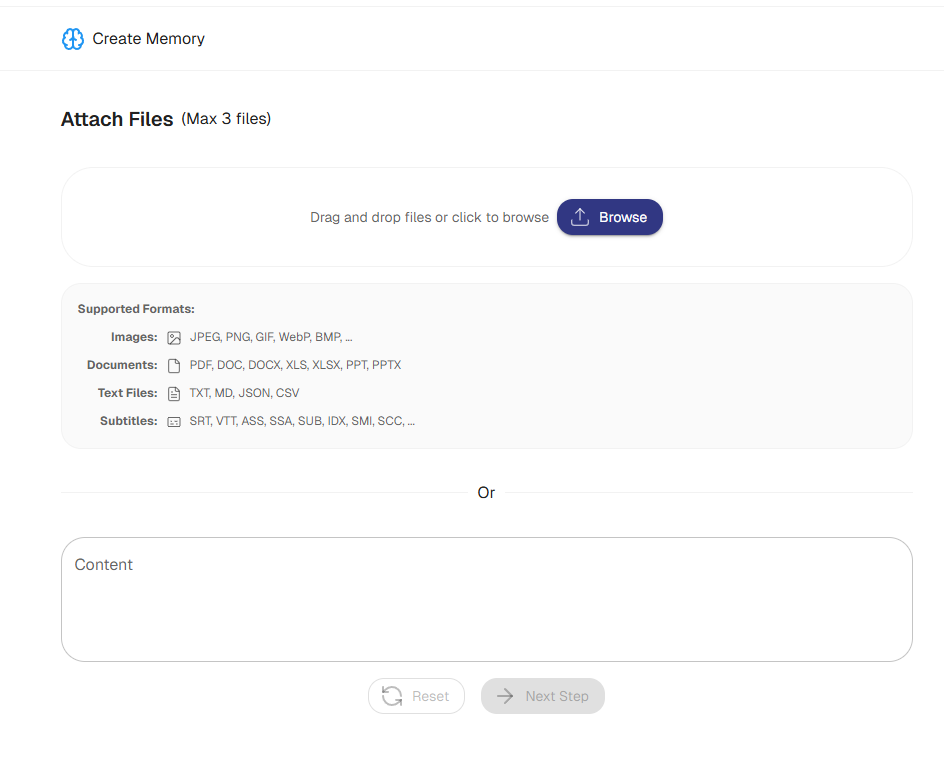
- Select and Upload Your File:
- Choose the supported formats document containing your ChatGPT memories.
- Save it to the preferred categories and Marketr will find the content related to selected category in the uploaded file.
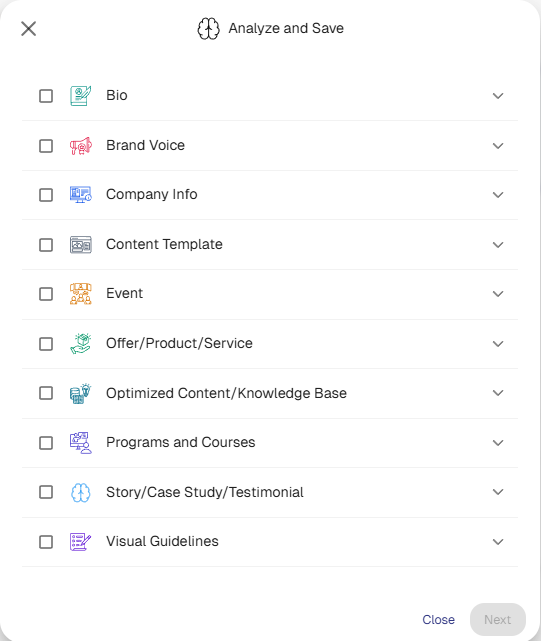
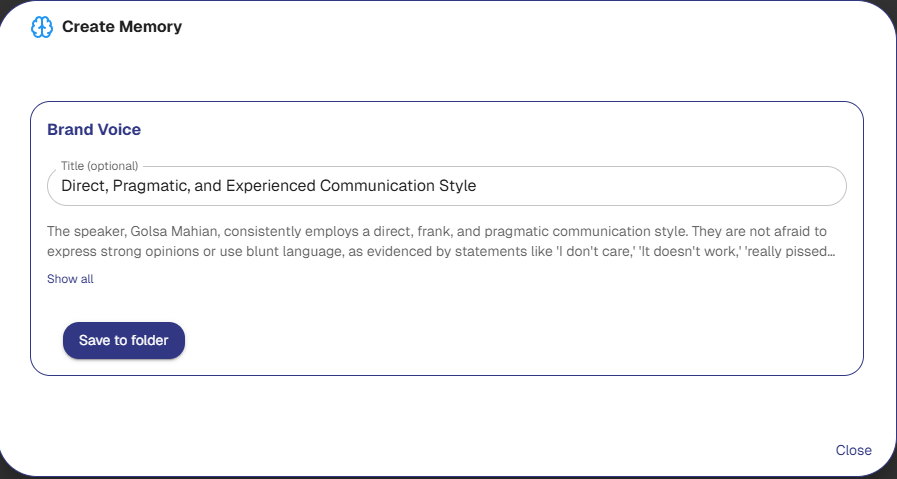
Then you can save it to a folder.
- Important Note: ChatGPT does not retain visual guidelines accurately, and its raw output for brand voice is often suboptimal. Therefore, for these specific elements, do not select or expect Marketr AI to extract them directly from the initial paste.
Specialized Brand Voice Transfer:
- For accurate brand voice integration, after saving the general memory, you will use a dedicated tool within Marketr AI.
- Go to the "Superprompts" section.
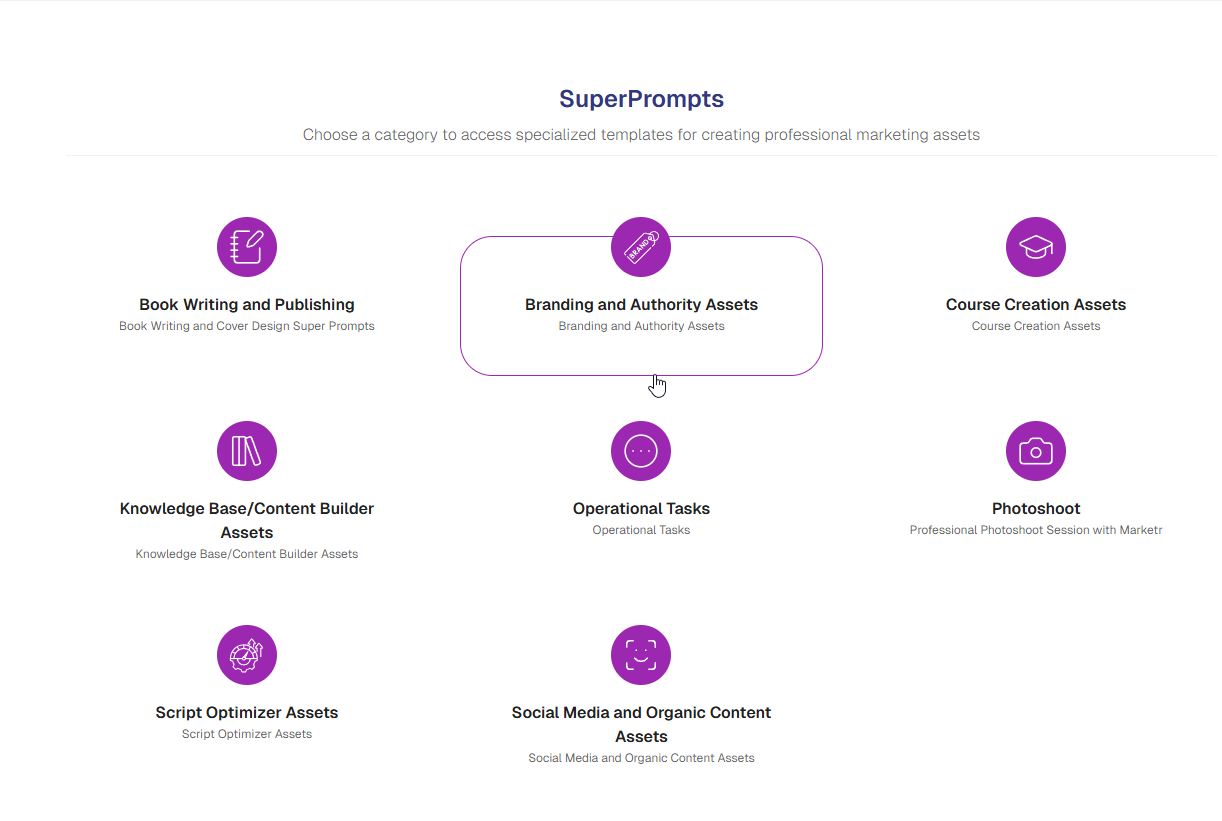
- Under "Branding," locate and use the "Brand Voice Super Prompt Extractor from Chat GPT."
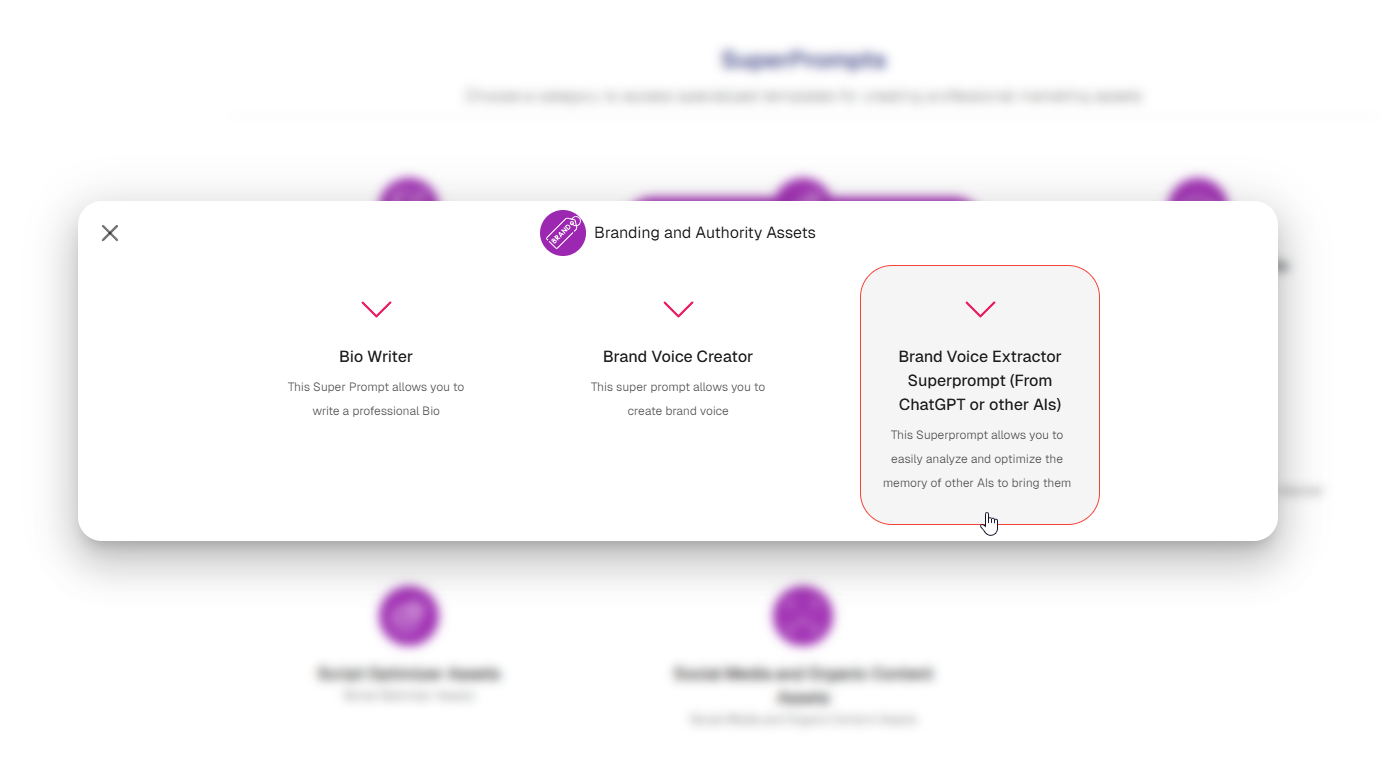
- Paste the same memory content you copied from ChatGPT into this extractor.
- Marketr AI will then clean and refine the brand voice elements, making them suitable for your profile.
- Once cleaned, save this refined brand voice to your memories.
By transferring your memories, you empower Marketr AI to provide even more tailored and effective marketing and sales strategies, leveraging your existing knowledge base for superior performance.
Was this article helpful?
That’s Great!
Thank you for your feedback
Sorry! We couldn't be helpful
Thank you for your feedback
Feedback sent
We appreciate your effort and will try to fix the article