Marketr AI offers various "Free Style Chat" modes, each designed to optimize the AI's response style and depth of analysis for different types of queries. Understanding these modes allows you to tailor your interaction for the most effective and insightful results, particularly when seeking marketing and sales guidance.
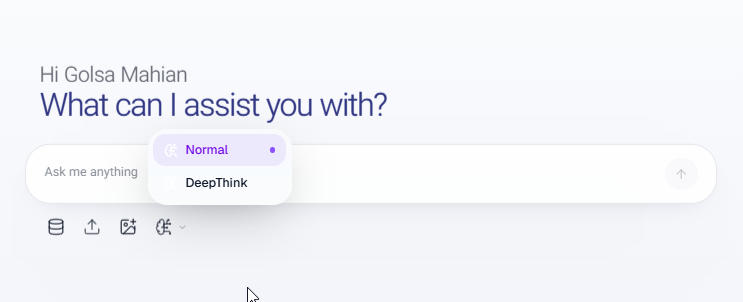
Mode Explanations and Usage Guidance
Normal Mode
- Explanation: This is the default operational mode, providing balanced, direct, and comprehensive answers. It's suitable for general inquiries, straightforward requests, and quick information retrieval. Responses are typically clear, concise, and focused on practical application.
- Best Use Cases for Clients:
- Generating standard marketing copy (e.g., social media captions, email subject lines).
- Asking for definitions or explanations of marketing terms.
- Requesting basic strategic advice or brainstorming initial ideas.
- Getting quick summaries of marketing concepts.
Deep Think Mode
- Explanation: In Deep Think mode, Marketr AI engages in a more thorough and analytical process. It delves deeper into the nuances of a request, considering various angles, potential implications, and underlying principles. Responses will be more detailed, often exploring context and providing a richer foundation for decision-making.
- Best Use Cases for Clients:
- Developing comprehensive content outlines or campaign strategies.
- Analyzing customer pain points and motivations in detail.
- Requesting in-depth explanations of complex marketing frameworks.
- Exploring different strategic approaches for a given challenge.
Was this article helpful?
That’s Great!
Thank you for your feedback
Sorry! We couldn't be helpful
Thank you for your feedback
Feedback sent
We appreciate your effort and will try to fix the article